
Overview
Jobber works with Apple CarPlay so you can stay on top of your schedule without picking up your phone. While you drive, you can see your day’s visits, get directions, and reach out to clients — all from your car’s display.
When using Jobber with Apple CarPlay, you can:
-
See your schedule for the day
-
View key appointment details - like property address and job title
-
Navigate to your next appointment through Apple Maps
-
Text your client an On my Way message
-
Call your client
Requirements to use Jobber with Apple CarPlay
To use Jobber with Apple CarPlay, you need:
- An iPhone with the Jobber app installed at version 6.86 or later
- A vehicle with Apple CarPlay support
To update the Jobber app, open the App Store on your iPhone, then select Updates.
Jobber is available to use with Apple CarPlay on all plans. View our current pricing plans.
To check what plan you’re on, select the Gear Icon, then choose Account and Billing. If you have any questions about your plan’s features or pricing, our support team is here to help!
See your schedule in CarPlay
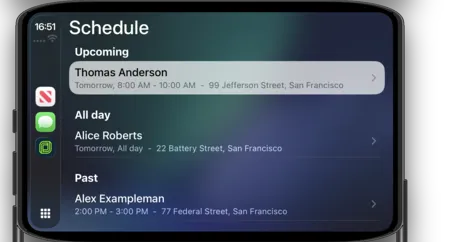
Jobber displays your assigned visits for the day on your CarPlay screen. Visits appear in three categories:
- Upcoming: visits scheduled for today or within the next 24 hours
- All day: visits assigned to you with no set time
- Past: visits from earlier today that are complete or whose scheduled time has passed
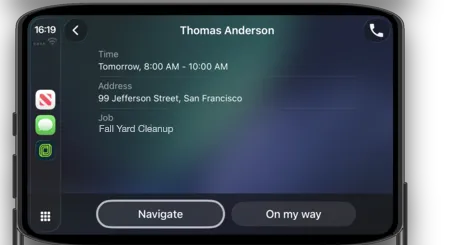
Tap any visit to see the job title, location, and client details.
Get directions to a visit in CarPlay
When you tap a visit in CarPlay, Jobber gives you the option to open navigation. Tap the navigation option to launch Apple Maps with the visit address loaded.
Apple Maps is the default navigation app. Additional navigation preferences are not available at this time.
Send an “On My Way” message with CarPlay
From the visit details screen in CarPlay, tap Send On My Way! to notify your client that you are on your way. Jobber sends the message on your behalf.
Call your client from CarPlay
From the visit details screen, tap the call option to phone your client directly through CarPlay.